Interface Guide
Title Bar

No. |
Name |
Function Description |
|---|---|---|
① |
Software Name |
Displays the current software name and version number |
Toolbar

No. |
Name |
Function Description |
|---|---|---|
① |
Select Device |
Choose and connect different devices (e.g., ICBricks, ICRobot, ICMaster) |
② |
Firmware Burning |
Select and burn standard firmware or XiaoZhi AI firmware to ICRobot |
③ |
File |
Dropdown menu includes: New Project, Open Local Project, Save As, Export Project, Save Snapshot |
④ |
Project |
Rename the current project |
⑤ |
Mode |
Switch between Live Mode and Download Mode |
⑥ |
Settings |
Change settings for language, theme colour, desktop content, as well as serial connection, Bluetooth connection, firmware burning, WiFi QR code generation, and WiFi connection function selection |
⑦ |
Help |
View Desktop Setup Guide, Privacy Policy, About, Source Code Info, Donation Page |
⑧ |
Open AI Mode |
The AI conversation-based feature for generating building block code is currently in the testing phase and has not yet been officially released for use. |
Editing Interface
Live Mode
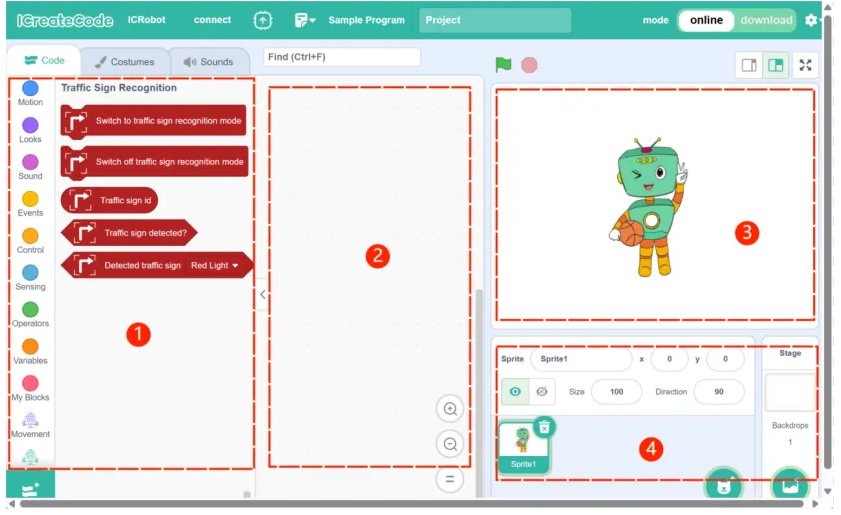
No. |
Name |
Function Description |
|---|---|---|
① |
Block Instructions |
Used to select different types of building block instructions and different types of extensions. |
② |
Coding Area |
Drag and drop blocks here to create your program |
③ |
Stage Area |
Shows real-time feedback and interactions of programmed characters |
④ |
Character Area |
Add/edit characters or background images for the stage |
Download Mode
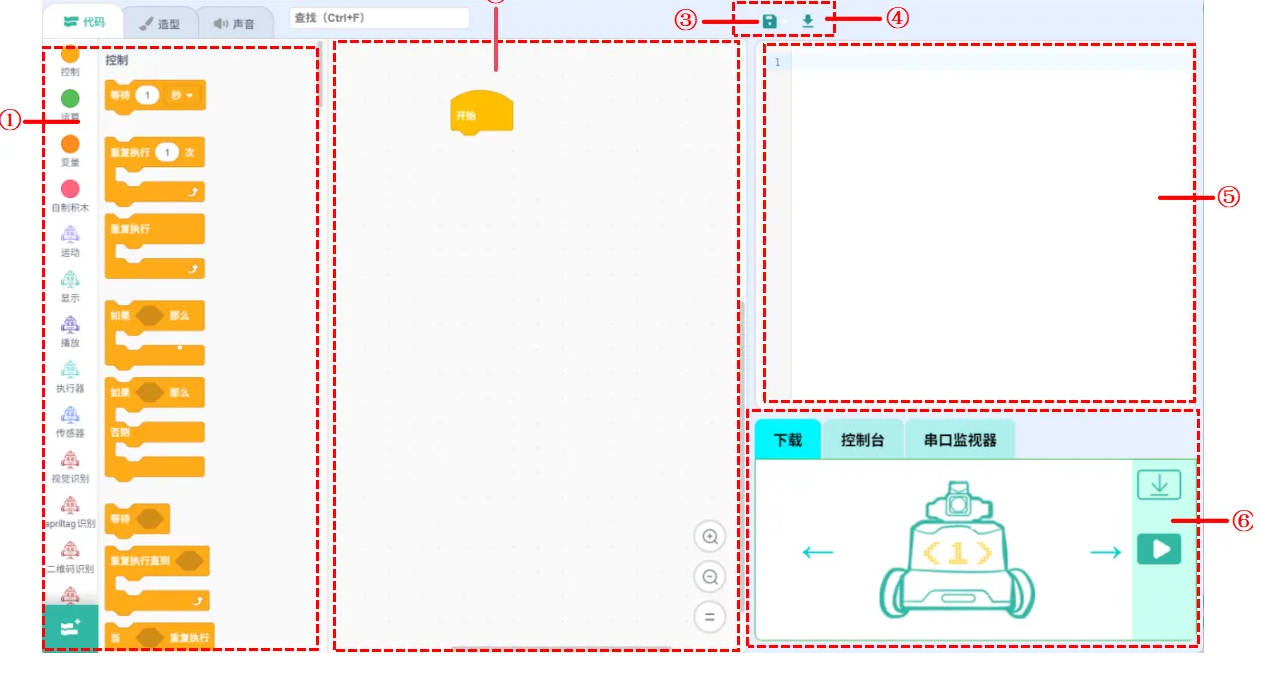
No. |
Name |
Function Description |
|---|---|---|
① |
Block Instructions |
Used to select different types of building block instructions and different types of extensions. |
② |
Coding Area |
Drag and drop blocks here to create your program |
③ |
Save |
Save the current project locally. |
④ |
Import |
Import existing .py files for use in the current project. |
⑤ |
Python Coding Area |
This area can be used to display the Python programming corresponding to the block commands on the left, which can be added or removed. |
⑥ |
Hardware Control Area |
Download: Upload code to the ICRobot. Console: View real-time sensor/button/camera states when connected. Serial Monitor: Send and receive serial data directly. |